Your AI Agent Now Takes Orders From Your Vendors
I have written about alerts instead of dashboards and about guardrails on what agents may do. This post is about something that sits underneath both: who gets to change what your agent is told. My short answer: an agent’s configuration (MCP servers, plugins, hooks and rules files) is production code. It needs an owner, change control and alerts, because otherwise your vendors can quietly become part of your agent’s chain of command.
The trigger is a case that went around developer circles at the start of November. According to a detailed GitHub report, the Postman desktop app installed plugins, a remote MCP connection and a startup instruction into developers’ coding agents without asking. Postman has since said it is reverting the change. Below is what is reported, what is confirmed, what is still open, and what I think every team running agents should take from it.
TL;DR: key takeaways
- What was reported. On 25 October 2026 a developer documented that opening Postman desktop 12.33.4 on a Mac triggered an automatic install that enabled Postman plugins in Claude Code and Codex, added a remote MCP server, a session-start hook and the Postman CLI. A commenter later reported a similar entry for the Copilot CLI.
- The sharpest detail. The hook told the agent to load Postman’s skill before any non-trivial API task, and the installer source contains code that tries to mark that hook as trusted.
- What Postman says. It meant to simplify setup, will redesign the experience “with the right level of control”, and is reverting the change. The issue was closed and locked on 5 November.
- What is still open. Which desktop release contains the revert, and whether machines that already got the plugins are cleaned up automatically.
- The lesson. Agent configuration changes what your agent does as much as code does. Give it an owner, keep it in version control, diff it on a schedule and alert on drift.
- The rule I apply. Nothing keeps trust it granted itself. A tool may propose a configuration change; only the owner approves it.
What happened, as reported
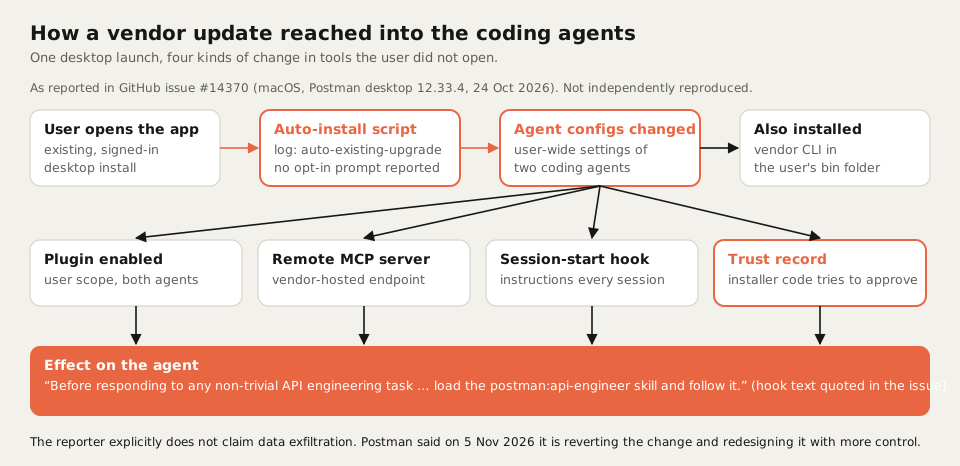
The report is GitHub issue #14370 on Postman’s own support tracker. It is unusually careful: it quotes log lines, configuration files and pinned source revisions, and it says what it does not prove. In summary:
- The trigger. The reporter opened an existing, signed-in Postman desktop install. Postman’s own log recorded an install with the source
auto-existing-upgradeand the resultclaude-code:installed, codex:installed. - Codex. The user-wide Codex configuration gained a Postman marketplace, an enabled Postman plugin and a trust record for a Postman session-start hook.
- The hook. It runs when a session starts, clears or compacts, and tells the agent: “Before responding to any non-trivial API engineering task … load the
postman:api-engineerskill and follow it.” That is much broader than a user asking for Postman. - Self-approval. The installer source calls a function to approve Postman’s own hook after installing it. The reporter notes that the trust record alone does not prove who created it, so the claim is that the code attempts it.
- A remote MCP server. The plugin pointed Codex at Postman’s hosted MCP endpoint, which failed on the reporter’s machine with “Auth required”.
- Claude Code and a CLI. A Postman plugin was enabled at user scope in Claude Code, and a Postman CLI was installed in the user’s local bin folder.
Other users in the thread reported the same path on later builds, and one commenter found a similar Postman entry in their Copilot CLI settings. The reporter explicitly says the report establishes unwanted integration and instruction changes and does not claim data exfiltration. I have not reproduced any of this myself.
What Postman has said and done
- 3 November. Postman’s head of product told RuntimeWire that the company bundles its CLI and agent plugins to ease setup, will make the opt-in clearer, especially for existing users, and is reviewing the hook approval and session-start behaviour.
- 5 November. A Postman team member replied in the issue that the change was meant to simplify setup for developers who build APIs with coding agents, that Postman “will be re-designing the experience with the right level of control”, and that “in the meantime, we are reverting this change”. Postman’s founder then closed and locked the issue.
- 5 to 10 November. Postman’s public plugin repository removed the Codex session-start hook and the installer’s automatic approval of it (#149), and made
removea complete uninstall, including the hook approval and marketplaces (#148). That shipped as version 0.8.0 on 10 November.
Status as of 10 November 2026: the issue is closed and locked, Postman says the automatic install is being reverted and the plugin no longer ships the Codex startup hook. Postman has not said publicly which desktop release contains the revert, and a question in the thread about machines that were already changed went unanswered before the lock. Notebookcheck also reports that reverting the change does not remove what is already installed. If you use Postman and a coding agent, check your agent configuration yourself.
Why this is bigger than one vendor
Postman is not the point. The point is that a coding agent’s behaviour is now shaped by files that many tools can write to, and few teams watch:
| Production code | Agent configuration today |
|---|---|
| Lives in a repository | Lives in home folders and app settings |
| Every change is a reviewed commit | Any installer with file access can change it |
| Has an owner | Usually nobody owns it |
| Deploys are logged and alerted | Changes are silent until the agent behaves oddly |
| Permissions are granted by a person | Trust can be written by the tool that wants it |
A session-start instruction is effectively a standing order to your agent. An MCP server decides what your agent can reach. A trust record decides what runs without asking. If a vendor can write all three, the vendor is part of your agent’s chain of command, whether anyone approved it or not. That is the same governance gap I described in MCP Gateway Lessons from Production: connecting a tool is easy, and deciding who may connect what is the actual work.
Agent configuration under change control
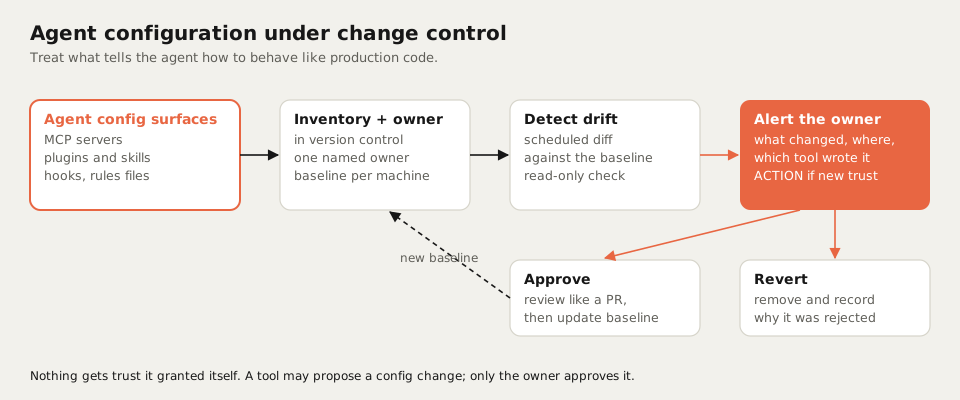
This is how I would put agent configuration on the same footing as code:
- Inventory. List every surface that changes agent behaviour, per agent and per machine.
- Owner and version control. Keep the intended configuration in a repository with one named owner. Rules files and skills belong next to the code they govern.
- Baseline and drift detection. A scheduled, read-only check compares the real configuration with the baseline.
- Alert, do not dashboard. A change produces one message to the owner: what changed, where, and which tool most likely wrote it. New trust or a new remote connection is an action, not an FYI.
- Approve or revert. An approved change goes through review like a pull request and becomes the new baseline. A rejected one is removed, with a note on why.
| Surface | What it controls | Control I would put on it |
|---|---|---|
| MCP servers | What the agent can reach | Allow-list, owner approval for any new remote endpoint |
| Plugins and skills | What the agent knows how to do | Install only on request, pinned versions, review on update |
| Session-start hooks | What the agent is told every session | Treated like code: reviewed text, no third-party mandates |
| Rules and instruction files | How the agent behaves in a repository | In version control, changed through pull requests |
| Trust and approval records | What runs without asking | Granted only by the owner, never by the installer |
How this maps to how I run my own agents
None of this is exotic. It is the same set of habits I described in how I manage a team of AI agents, applied one layer down:
- Read-only first. The drift check only reads. It never “fixes” anything on its own; that would be one more tool writing to agent configuration without asking.
- Approval gates. Anything that changes what an agent can reach or is told is an externally significant change, and it waits for an explicit yes from the owner, the same way merging and publishing do.
- Alerts instead of dashboards. Nobody will open a configuration dashboard every morning. One message when something changed, and silence when nothing did, is what gets read.
- Least privilege per agent. Each agent gets the tools its job needs and nothing more, so a surprise plugin stands out instead of disappearing into a long list.
It is also a reminder to be selective about what you install in the first place. I made the same argument about agent skills that are actually worth installing: every skill and plugin is a standing instruction, so it should earn its place.
What I would tell someone running coding agents
- Check your machines now if you use Postman and a coding agent. Look for Postman entries in your agents’ user-wide settings and remove what you did not choose.
- Name an owner for agent configuration. Per team, not per tool.
- Put rules files, skills and MCP settings in version control. If it changes behaviour, it gets reviewed.
- Diff on a schedule and alert on drift. Read-only, once a day is enough to start.
- Treat new trust as an approval. A tool that grants itself trust should be treated as a finding, not a feature.
- Ask vendors the question directly. “What will your product write into our agents’ configuration, and how do we opt in?” should be part of any tool evaluation.
Agents take instructions from whatever is in their configuration. Making sure you decide what goes in there is the cheapest governance you will ever implement.